Sticker Picker View SwiftUI
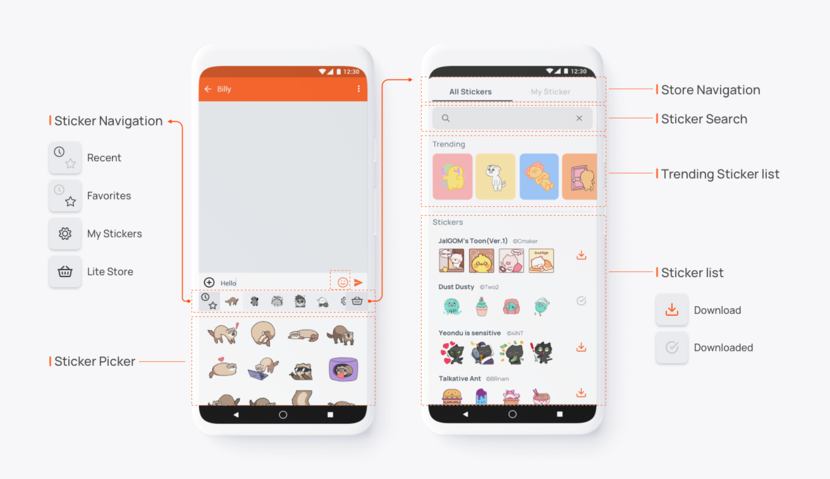
Sticker Picker View provides in-depth sticker experience. Instead of instantaneous usage from the Search View, users can download and own stickers for a more intimate sticker sending experience. It works similar to how stickers work on WhatsApp or Facebook Messenger. Users open up sticker picker and tap on stickers to send directly on chat, and click on 'sticker store' to browse more stickers and download to have them on sticker picker.
The Sticker Lite Store comes with over 150,000+ stickers that are curated automatically and updates with new stickers every week. By adding a single line of code, you'll be able to add this feature to your app, and customize the UI to make it better.
Components
Users can use the 4 main Store View components for intimate sticker usage:
• Sticker Navigation: Navigate through my sticker packs and tap on one.
• Sticker Picker: Tap on a sticker to send it to chat.
• Sticker Search: Search for sticker packs or sticker creators.
• Sticker list: Browse the most popular stickers to download and add to my sticker picker.
Before you begin
Make sure you went through all processes in Before You Begin to download and setup the Stipop.plist file, which is required to complete development of the SDK.
How to use
You can simply show our SDK.

1
Stipop.showKeyboard()
Next step: Implement Sticker Send
Now that you've got the Sticker Picker View done, let's implement sticker send so you can start sending stickers on your app.

 Back
Back